Decision intelligence for Jira that keeps product work aligned with core business intent
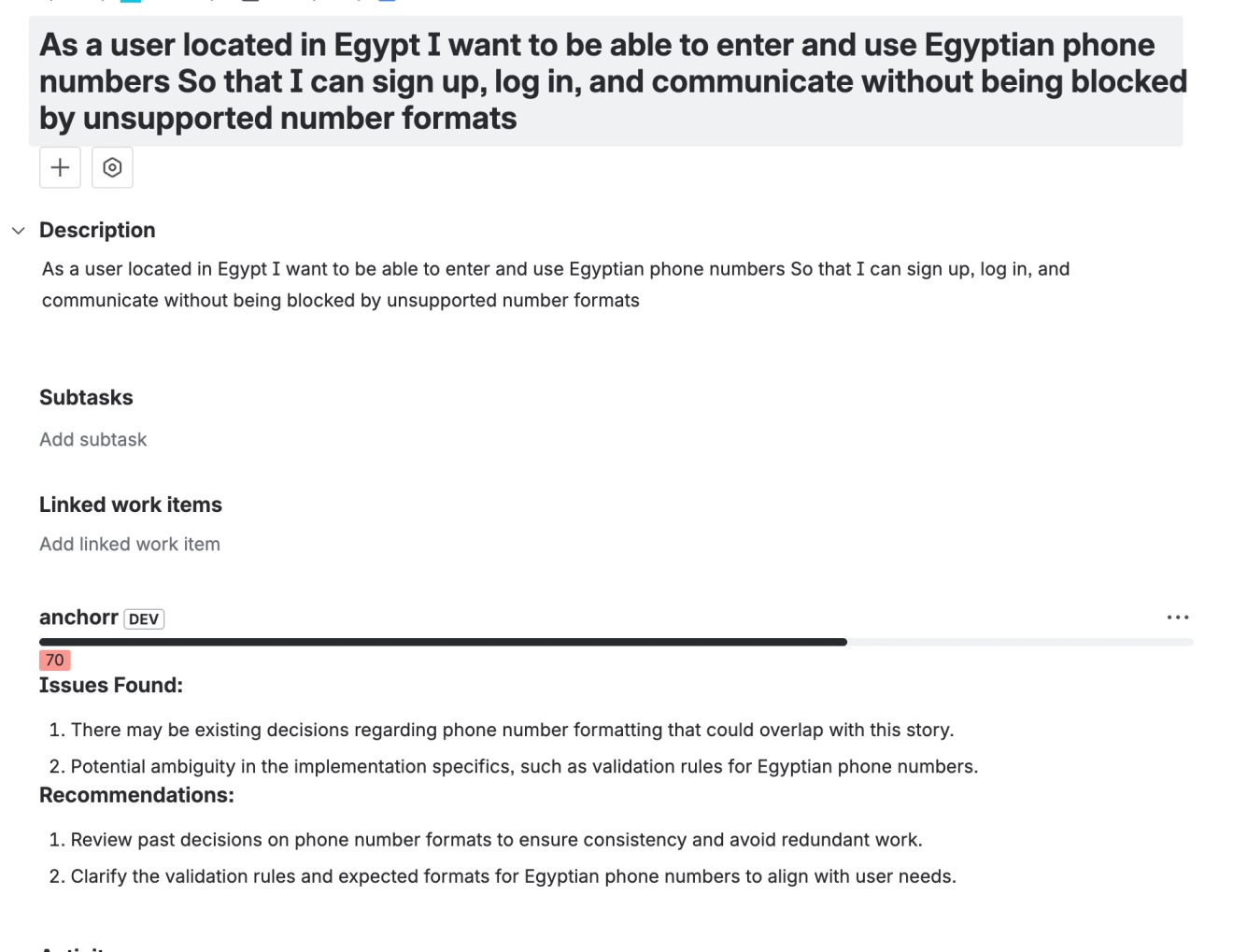
1. Login to your Atlassian account and select the Jira project where Anchor is installed. If Anchor is not installed yet, install it from the Atlassian Marketplace.
Learn More2. After installing Anchor on your Jira Board Create a Jira ticket or user story by writing a clear title and description that explains the feature or change you want to build.
3. Anchor automatically compares the new ticket with similar past tickets and decisions to detect potential product or business conflicts before development starts.
Product decisions shouldn’t depend on memory.
Anchor uses RAG models to analyze your docs and Jira history, surfacing context, risks, and conflicts so teams make consistent, informed decisions every time.
Product management is broken — or at least the way most teams practice it.
Decisions live in documents, tickets, Slack threads, and people’s heads. Over time, context is lost, assumptions drift, and teams unknowingly repeat or contradict past decisions.
Anchor replaces fragile human memory with a decision intelligence layer for Jira. Using RAG-based models, it continuously analyzes your product documentation and historical Jira tickets to provide accurate, contextual analysis on every new decision — directly where work happens.
Instead of relying on what someone remembers, teams rely on what was actually decided.